Infinite opportunities?  Endless problems?  Limited resources?  Talk to us!
Operations
Consulting
Software
Consulting
Publishing and
Training
Applied
Solutions
Excel add-ins
and tutorials
Charts Excel and VBA
Case Studies
VBA
tutorials
PowerPoint
Add-Ins
Miscellenia
You are on the Home/Excel/Tutorials/RDBMS in Excel/Query Results page

Building and using a relational database in Excel (with a little help from MS Query)

Five management queries

Using Excel's Get External Data command, one can use MS Query to create a query against the relational database. The result of this query can be a new table in an Excel spreadsheet, or a PivotTable, which in itself is a powerful tool for data analysis!  MS Query provides the necessary infrastructure to link the tables using the specified keys.  Before discussing how these queries are built, here are the results of three queries:

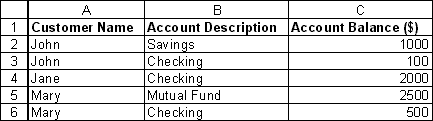
A list of customers and their accounts
 

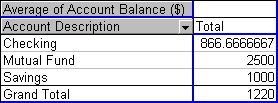
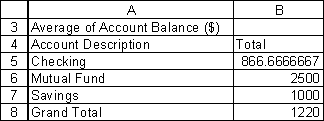
A list of account types and the average balance in each type

On the screen:
and as printed:
About this site

What's new

Google
Web
This Site


A cross-table of the number of accounts by customer city and account type

A parameterized query to list of customers in a zip code that is specified dynamically
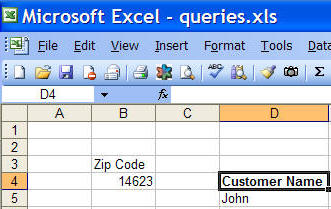
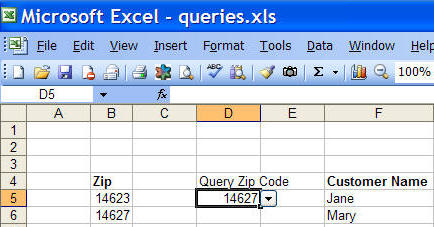
A parameterized query to list of customers in a zip code selected from a drop down list of valid zip codes


For custom technology solutions, operations consulting, or training contact web-underscore-contact@tushar-hyphen-mehta-dot-cee-oh-em.
By accessing any page or link on this web site other than this page, you agree to the terms and conditions.

Ads from amazon.com

[Optional] Survey (current rating of site: 3.7 out of 4)  If you will take a moment to provide your comments, it will help improve the site both for you, and for other visitors.

On a scale of 4 (just what I need)
to zero (totally useless)

How do you rate the information

on this page?

  on this site?

[Optional]

Your name
Your email address
Other comments
 
Monitor page
for changes
    
   it's private  

by ChangeDetection
A comment selected at random:


Copyright © 2000-2008 Tushar Mehta.
Send comments and suggestions about the web site to webmaster@tushar-hyphen-mehta-dot-cee-oh-em
Last edited April 13, 2008