Now that we know how to link to MS Query, how to add tables to a query within MS Query, how to add fields to the query, and how to return data to Excel, we can expedite building this query. Once in MS Query add all three tables to the query, link them, and add the City and Account Description fields to the query result.
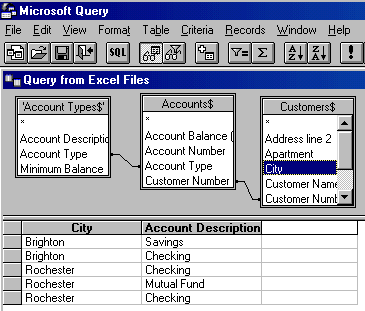
Back in Excel, create the PivotTable with City as the Row Field, Account Description as the Column field, and reusing Account Description as the Data Field. To change the default name that Excel uses (Count of Account Description), double click on it and in the resulting dialog box enter a more appropriate name.
The result:


