 Works with Excel 2000
(or later) only. Works with Excel 2000
(or later) only. |
 2010 (32 bit and 64 bit)
 2007
2007
 2003
2003
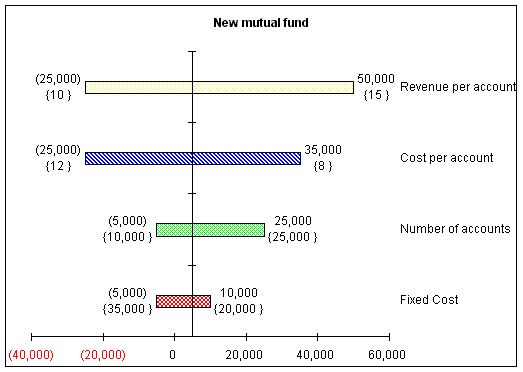
Tornado diagrams graphically display the result of single-factor sensitivity analysis. This lets one evaluate the risk associated with the uncertainty in each of the variables that affect the outcome. Single-factor analysis means that we measure the effect on the outcome of each factor, one at a time, while holding the others at their nominal (or base) value. The software adjusts each factor between the specified minimum (or low) and maximum (or high) values while recording the value of the outcome. It then plots the resulting data in a bar chart. A typical diagram looks like Figure 1, which shows the effect of four parameters on the result. The uncertainty in the parameter associated with the largest bar, the one at the top of the chart, has the maximum impact on the result, with each successive lower bar having a lesser impact. This arrangement is why the result is called a Tornado Diagram.
For installation instructions see Common Installation Instructions.
Once loaded, in 2007 or later, use the TM tab | Data Analysis group | Tornado Diagram button or, in 2003 or earlier, use the TM menu | TM Tornado sub-menu > Tornado Diagram... menu item. For more click the Online Documentation link below.
Start by downloading either the self-installing version or the zip version.
version 4

