Infinite opportunities?  Endless problems?  Limited resources?  Talk to us!
Operations
Consulting
Software
Consulting
Publishing and
Training
Applied
Solutions
Excel add-ins
and tutorials
Charts Excel and VBA
Case Studies
VBA
tutorials
PowerPoint
Add-Ins
Miscellenia
You are on the Home/Excel/Tutorials/Dynamic Charts/Drop Down Box page
 

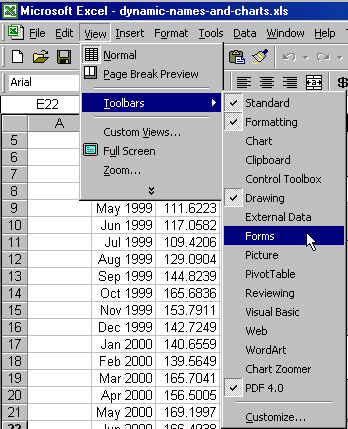
To create the drop-down box for use in a worksheet (as in example 6 in the dynamic_charts page), follow the directions below.


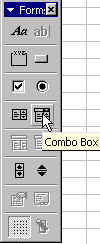
The Forms toolbar contains the Combo box control.

snapshot025.jpg (34412 bytes)
 

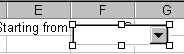
Select the Combo Box, draw it on the worksheet so that it covers cell F1


Right click on the box, and select Format Control...  From the Control tab, specify the Input Range as XRange, and the Cell Link as $F$1 (remember, it is easier and less error prone to click the cell with the mouse rather than type in the cell address).

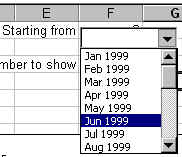
snapshot029.jpg (15760 bytes)
 

Click anywhere in the worksheet so that the drop-down box no longer has the handles (squares at the corners and the centers of the edges) around it.  Now it is ready for use.  Select any month as the starting month and watch the chart change.


For custom technology solutions, operations consulting, or training contact web-underscore-contact@tushar-hyphen-mehta-dot-cee-oh-em.
By accessing any page or link on this web site other than this page, you agree to the terms and conditions.

Ads from amazon.com

[Optional] Survey (current rating of site: 3.7 out of 4)  If you will take a moment to provide your comments, it will help improve the site both for you, and for other visitors.

On a scale of 4 (just what I need)
to zero (totally useless)

How do you rate the information

on this page?

  on this site?

[Optional]

Your name
Your email address
Other comments
 
Monitor page
for changes
    
   it's private  

by ChangeDetection
A comment selected at random:


Copyright © 2000-2008 Tushar Mehta.
Send comments and suggestions about the web site to webmaster@tushar-hyphen-mehta-dot-cee-oh-em
Last edited April 13, 2008