This add-in allows a developer to add a calendar to a userform with almost zero programming. The supported calendar is shown in Figure 1.
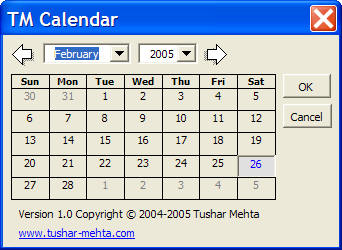
Figure 1
Download the XLA file. By downloading the file you agree that you understand the software is copyright © Tushar Mehta and you will make no attempt to reverse engineer or in any other way attempt to access the source.
After downloading the file, unzip it and save the XLA file in a folder of your choice.
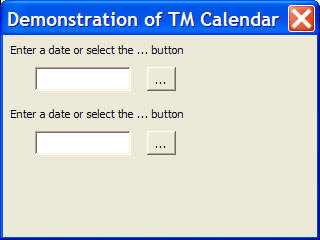
This add-in makes it extremely easy for a developer to add a calendar capability to a userform. Consider the demonstration userform in Figure 2. Clicking either of the ... buttons brings up the calendar of Figure 1. When the user makes a selection, that date is returned to the developer. If the user cancels the dialog box, the function returns False.
The developer can choose to connect to the add-in either by using Application.Run or by establishing a reference to the add-in. In either case, the total code required to use the add-in's capability is one line!
To directly call the add-in (i.e., without establishing a reference) and assuming the add-in is installed in the user library location, the code would be:
    Me.TextBox1.Text = Application.Run("'" & Application.UserLibraryPath _
        & "tm vba calendar.xla'!getDate")
With a reference to the TM VBA Calendar.xla file, the code would be:
Me.TextBox2.Text = TMCalendar.getDate
The user sees a familiar layout for a month-by-month calendar. Making any selection changes the highlight for that date. The user can choose to OK the final selection or Cancel the dialog box.
For use by a developer for development and testing of her/his own software the add-in is free.
For distribution with the software that uses the add-in, the cost is $49.95. This entitles the developer to distribute the add-in. It does not give her/him access to the source code.
For the source code, the cost is $99.95.

