Infinite opportunities?  Endless problems?  Limited resources?  Talk to us!
Operations
Consulting
Software
Consulting
Publishing and
Training
Applied
Solutions
Excel add-ins
and tutorials
Charts Excel and VBA
Case Studies
VBA
tutorials
PowerPoint
Add-Ins
Miscellenia
You are on the Home/Excel/Tutorials/Worksheet as Gantt Chart page
About this site
Google
Web
This Site
 

Using a Worksheet for a Gantt Chart - I

One application of an overlooked capability is the ability to format Excel worksheet cells so that the final result is that they convey information visually rather than through numbers.  There are many applications of this technique such as creating a Gantt chart.

A Gantt Chart

The layout for the data is as shown below.  Task specific information is in columns A and B with the the start and end dates in columns C and D respectively.  Row 1 starting with column E has calendar dates.

What we want is to see the grid encompassed by the columns on the left and the row at the top filled with the appropriate color for those dates when a particular task is scheduled.

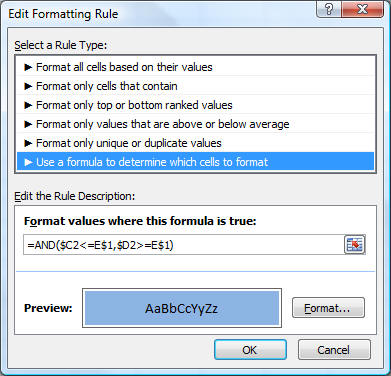
The above is quite easy to do.  Select E2 and set its conditional format as below.

with the format set to the desired color.

Now, copy E2 to the entire range that represents the grid identified by the columns on the left and row at the top.  This will create the desired visual effect of a Gantt chart.

 

For custom technology solutions, operations consulting, or training contact web-underscore-contact@tushar-hyphen-mehta-dot-cee-oh-em.
By accessing any page or link on this web site other than this page, you agree to the terms and conditions.

Ads from amazon.com

[Optional] Survey (current rating of site: 3.7 out of 4)  If you will take a moment to provide your comments, it will help improve the site both for you, and for other visitors.

On a scale of 4 (just what I need)
to zero (totally useless)

How do you rate the information

on this page?

  on this site?

[Optional]

Your name
Your email address
Other comments
 
Monitor page
for changes

it's private
by ChangeDetection
A comment selected at random:
Copyright © 2000-2008 Tushar Mehta.
Send comments and suggestions about the web site to webmaster@tushar-hyphen-mehta-dot-cee-oh-em
Last edited November 01, 2008