A relational database consists of some number of tables, each of which contains information about some business aspect. Each column in the table identifies a key component of the data stored in the table while the rows contain the actual information itself. Further, each table is related to one or more of the other tables by a key piece of shared information. For example, a financial institution might have three tables called Customers, Account Types, and Customer Accounts, and the Customer and Customer Accounts table sharing the Customer Number and the Account Types and Customer Accounts sharing the Account Type.
Each of the tables is in its own spreadsheet in the same workbook. The sheet names reflect the table names as in:

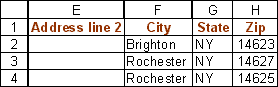
The Customer table contains information about customers and looks like:

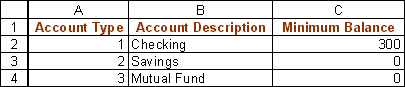
The Account Type table identifies the types of accounts the bank offers and looks like:
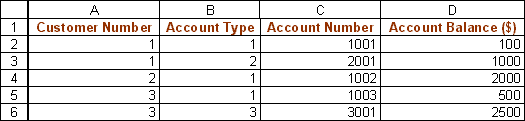
One of the advantages of a relational database is that the information about a customer exists only once in the Customer table. Consequently, if the customer relocates, the firm has to update just one row in one table. Similarly, if the firm changes its policies about the minimum balance requirements for the different types of accounts only one table needs updating.

