The final result
Figure 10 and Figure 11 below show the result of automatic maintenance of the
axes limits. Once the OK button in the dialog box is clicked, the chart
will reflect the values in cells D1:E2. As the cell values change, the
chart will update automatically.
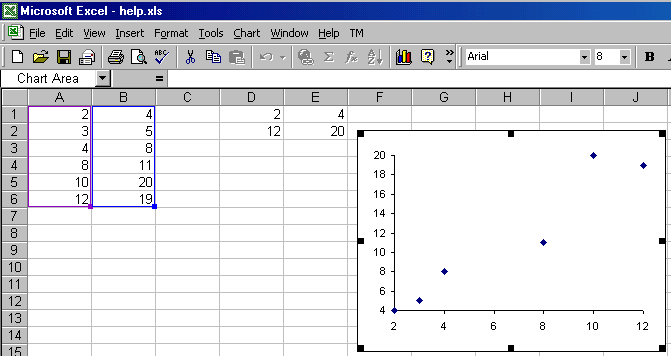 |
Figure 10
Since the data points are generated with a random generator, forcing a
recalculation (F9) yields different numbers in A1:B6. This causes the
minimum and maximum values associated with the x- and y-axes to change (see
cells D1:E2 in Figure 11 below). The final effect is that the axes and the
plotted data points change in the associated chart.
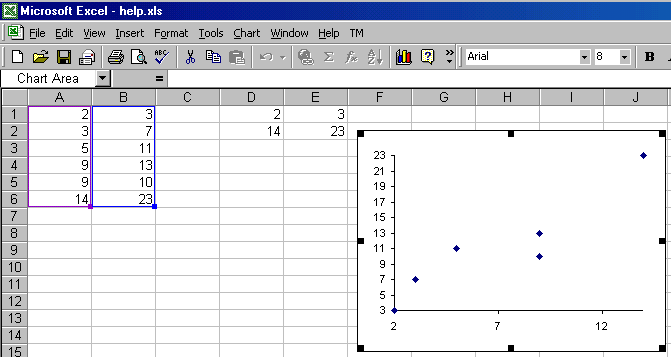 |
Figure 11
|
For custom technology solutions,
operations consulting, or training contact web-underscore-contact@tushar-hyphen-mehta-dot-cee-oh-em.
By accessing any page or link on this
web site other than this page,
you agree to the terms and conditions.
Ads from amazon.com
|
|
A comment selected at random:
|
|
Copyright © 2000-2008 Tushar Mehta.
Send comments and suggestions about the web site to webmaster@tushar-hyphen-mehta-dot-cee-oh-em
Last edited
April 13, 2008
|
|